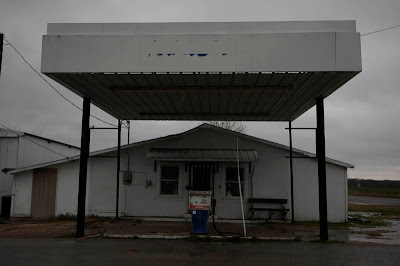
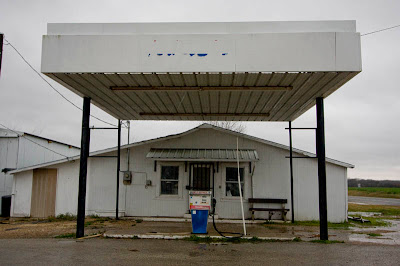

Mertens, Texas 2008
I realized that I tread dangerously toward boredom, but some might find it interesting to read about my workflow of this image. What with all the rage about Lightroom and ARC for RAW converstion, I think it worthwhile to mention PhaseOne's Capture One 4. I own a legit copy of Lightroom (LR) and have even updated it to v1.3 because it covers conversion for my Canon 40D, however, it is not my favorite program. Yes, its RAW converter is great and works well. But I have to tell you that I don't like the way it handles files. If for some reason you need/want to move a file to another location, LR acts as if you have committed some unforgiveable crime and will tell you the files are lost. Another example: I had d/l'd all my CF cards -- all six of them, about 10-gigs of images -- from my recent Texas trip onto my laptop and Passport drive (backup). When I up/l'd from the Passport to my desktop, left out about about 25 files by accident (didn't get highlighted for copy), and only realized I had done so AFTER processing everything through LR. So I go back, add the missing files via "explorer" to the correct folder, and try to look at them in LR. Now the original files in that folder have become "lost" according to LR, and I have yet to find a way to get them recognized by LR again. It sees the added files, but not the older files. GRRRRR The only reason I have LR to begin with is because Adobe bought Pixmantec/RAWShooter. I was a confirmed RAWShooter Premium (RS) devotee and was extremely disappointed when Adobe pulled it from the market.
Exit LR, and d/l the trial copy of Capture One 4. I have used C-1 in the past, it is on my old laptop (now owned by my daughter), but that version C-1 (3.7) doesn't cover the 40D. C-1 is very close to what RS was in terms of ease of use and functions, and with v4 it has added many new functions as well as a whole new look. Surprise! It has the same gray background as does LR and Aperture (Mac only program). To make this a short story, I'm in love again. C-1 4 does it for me. It doesn't care where you put the images...amen. I think that if, I SAY IF, I were a working photographer doing weddings, events, product illustration, so on, so forth, I would probably use LR, but it is just too much program for the small amout of work someone like me does on a weekly/monthly basis. C-1 4 is only $99 and I think a real bargain.
The first Mertens image above is as the Canon 40D saw it, shot in RAW at ISO 400, 10-22mm Canon EFs lens, 1/160 at f/6/3, set at 21mm. I must admit that I was shooting in the rain, while I checked the histogram, I didn't check it closely -- me and the camera were getting wet. Normally I would have given this image at least another stop of exposure.
The second image is after RAW processing. In C-1 4, I increased the exposure, open the shadows with the "shadows" slider, white balanced off the broad front of that big overhang. It didn't need anything else. No noise suppression, but sharpening is set at about 25%. That's it. C-1 4 did the rest.
The third image has been finalized in PS CS2. I started by putting on a grid, select "all" and using the transform "distort" tool to straighten/level the building. Then I used the "shadow/highlight" tool to open the shadows. Slight dodging and buring -- took the pavement down a little, and opened the colors of the pump. Cropped slightly. Finally added a color balance layer to tweak the colors. And that's it. Of course, I downsized it, sharpened it, and saved as a JPEG. I spent all of 10-minutes getting it ready for the web.
The above is typical for me. I rarely find need to work images beyond the basics. There are times I will add a curves layer to further adjust the tones of the image, sometime I might even have a second curve layer to work a specific tonal area, or to just increase the tone separation/internat contrast of the image. Internal contrast can also be boosted via USM with a high radius (around 60) and percentage from 10-20%. I give a lot of credit to better sensors with more dynamic range, and to much improved RAW converters. I work in Adobe RGB (1998) color space, and my system calibration is maintained regularly. Core to this work flow is my Samsung 214T monitor. Yes, I use a PC -- HP with AMD 64 Athlon that I've had for over three years now. Before the month is out I'm buy a new box -- working on the details now. Tomorrow I'll be back to posting old Texas places.


